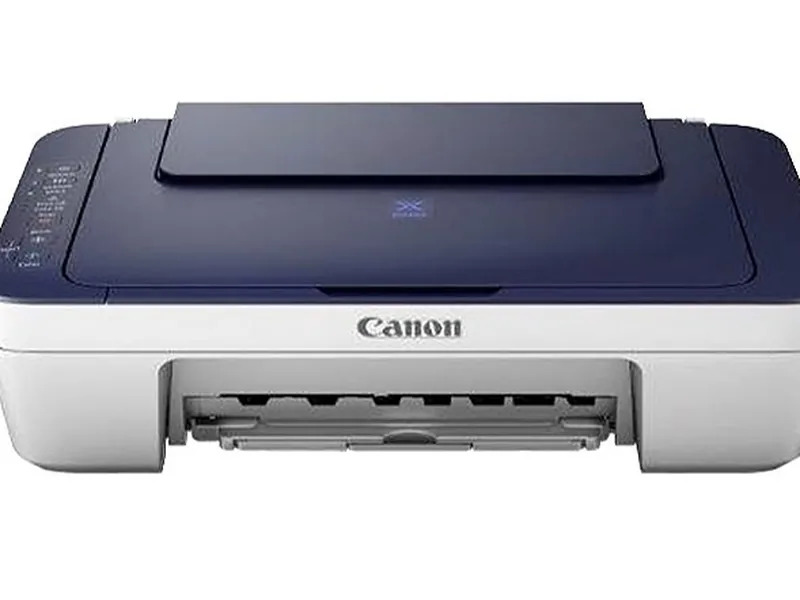
About Canon PIXMA E477 Print Scan Copy Wifi Printer
Experience grandiose performance and magnificent convenience with the Canon PIXMA E477 Print Scan Copy WiFi Printer. Specially crafted for home and small office use, this all-in-one inkjet printer offers unbeatable value at the best price. Effortlessly handle print, scan, and copy tasks with wireless connectivity and mobile printing support. Its compact design fits seamlessly into any workspace. With robust cartridge yield and versatile compatibility, adding this powerful printer to your cart is a smart choice for efficient, reliable, and energy-saving document handling every day.
Versatile Printing for Home and Office
Designed for home and small office use, the Canon PIXMA E477 excels in multifunctionality-print, scan, and copy-all in one compact unit. Its user-friendly interface and WiFi support make document management seamless and fast. With borderless printing and color depth of 16-bit/8-bit, it delivers high-quality results for personal projects, office documents, and photographs alike, giving users a competitive advantage in productivity and convenience.
Export Markets and Premium Sale Policy
Canon PIXMA E477 is a premium choice for traders and suppliers targeting export markets in India and abroad. Every unit comes with a standard sample policy and certifications ensuring quality and reliability. Special quotation options and sale price deals are available for bulk purchases, making it a top pick in B2B sales. The printer's premium construction and trusted Canon warranty support global standards and diverse professional requirements.
FAQ's of Canon PIXMA E477 Print Scan Copy Wifi Printer:
Q: How do I set up the Canon PIXMA E477 for wireless printing?
A: To set up wireless printing, use the Canon PRINT Inkjet/SELPHY app or your computer's WiFi setup options. Follow the guided installation prompts included with the printer to connect to your wireless network securely.
Q: What operating systems are compatible with the PIXMA E477?
A: This printer supports Windows 10, 8.1, 7 SP1, and Mac OS X v10.8.5 or later, ensuring wide compatibility for most users' desktops and laptops.
Q: Where can I use the Canon PIXMA E477 most efficiently?
A: The PIXMA E477 performs excellently in home environments and small offices, offering multifunctionality and wireless features tailored to compact workspaces and moderate print volumes.
Q: What are the cartridge yields for black and color printing?
A: The PG-47 black cartridge yields up to 400 pages, while the CL-57s color cartridge can print up to 180 pages, providing economic and efficient printing for day-to-day needs.
Q: What is the process to print from mobile devices?
A: You can print directly from compatible mobile devices using the Canon PRINT Inkjet/SELPHY app, Google Cloud Print, or Apple AirPrint, making it easy to handle tasks from your smartphone or tablet.






 Send Inquiry


 Send Inquiry